USE CASES
AgentX in Action
Describe what you need in plain language, and AgentX guides you through reports, FX, withdrawals, deposits, reimbursements and wealth — leave the tedious workflows to the agent.
PLATFORM ARCHITECTURE
Platform Architecture
A four-layer platform — Intelligence, Capability Supply, Trust and Foundation — powering every AgentX task.
Agent Runtime
Intelligence LayerThe reasoning brain — plan, reason, reflect, evaluateIntent Understanding
Goal extraction · Context · Constraints
Planning Engine
Task decomposition · Execution plan
Reasoning Engine
Decision making · Knowledge fusion · Tool selection
Reflection Engine
Result validation · Gap detection · Retry decision
Evaluation Engine
Quality · Risk · Acceptance criteria
Workflow Orchestration
Task scheduling · DAG execution · Retry · State
Tool Intelligence
Discovery · Ranking · Reliability
Memory & Context
Session · User · Plan state · Cache
Internal Toolset
Search · Retrieval · Planner · Critic · Code runner
Sandbox
Python runtime · Script runtime · Secure execution
Audit
Execution trace · Reasoning trace · Tool logs · Compliance
Capability Hub
Capability Supply LayerTrusted marketplace of pluggable capabilitiesPublishing Admission & Governance
Publisher verification · Static scan · Sandbox validation · Signing
Capability Registry
MCP · Skill · Card · Plugin
Capability Operations
Catalog & tags · Versioning · Canary & rollback · Health check
Capability Lifecycle
Publish › Discover › Install › Upgrade › Deprecate › Remove
Security & Governance
Trust LayerSecurity and governance across every capability and actionCapability Security
Trusted-source verification · Signing · Malware detection · Policy compliance
Runtime Security
Permission control · Access control · Data isolation · Secret management
Risk Control
Risk assessment · Human approval · Action guardrails · Compliance audit
Infrastructure
Foundation LayerModels, data, events and observability that power the platformModel Infrastructure
LLM router · Model registry · Prompt management
Data Infrastructure
State store · Object storage · Cache layer
Event Infrastructure
Event bus · Queue system · Workflow events · Hooks
Observability
Metrics · Logs · Traces · Performance
Experimentation
A/B testing · Evaluation framework · Benchmark platform
Generate a PEVC / financial monitoring report
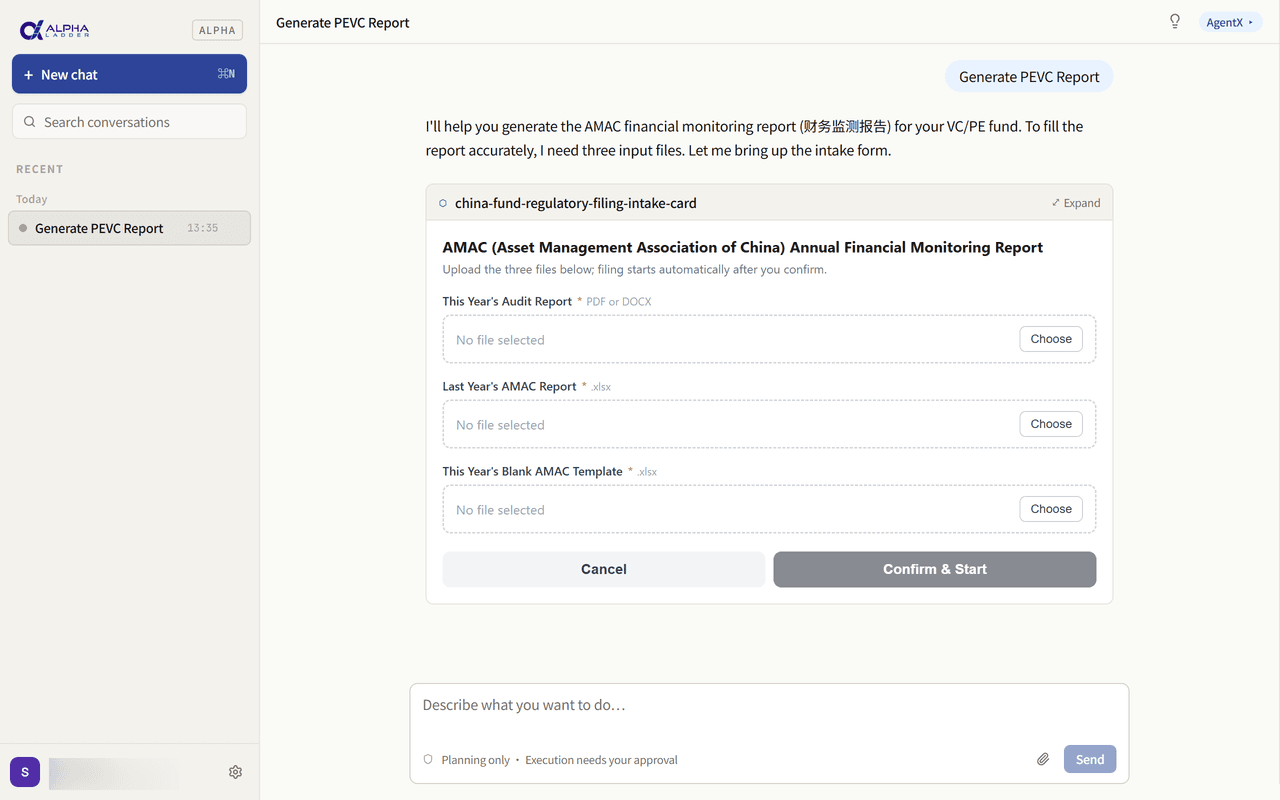
Just upload the source materials, and AgentX recognises the data and generates the report for you — cutting manual collation and form-filling to a minimum.
- 1
Ask AgentX to generate a report
For example: “Generate a PEVC report” or “Generate a financial monitoring report.”
- 2
AgentX guides you to upload the materials
Typically these include:
- This year’s audit report
- Last year’s AMAC filing
- This year’s blank AMAC template
- 3
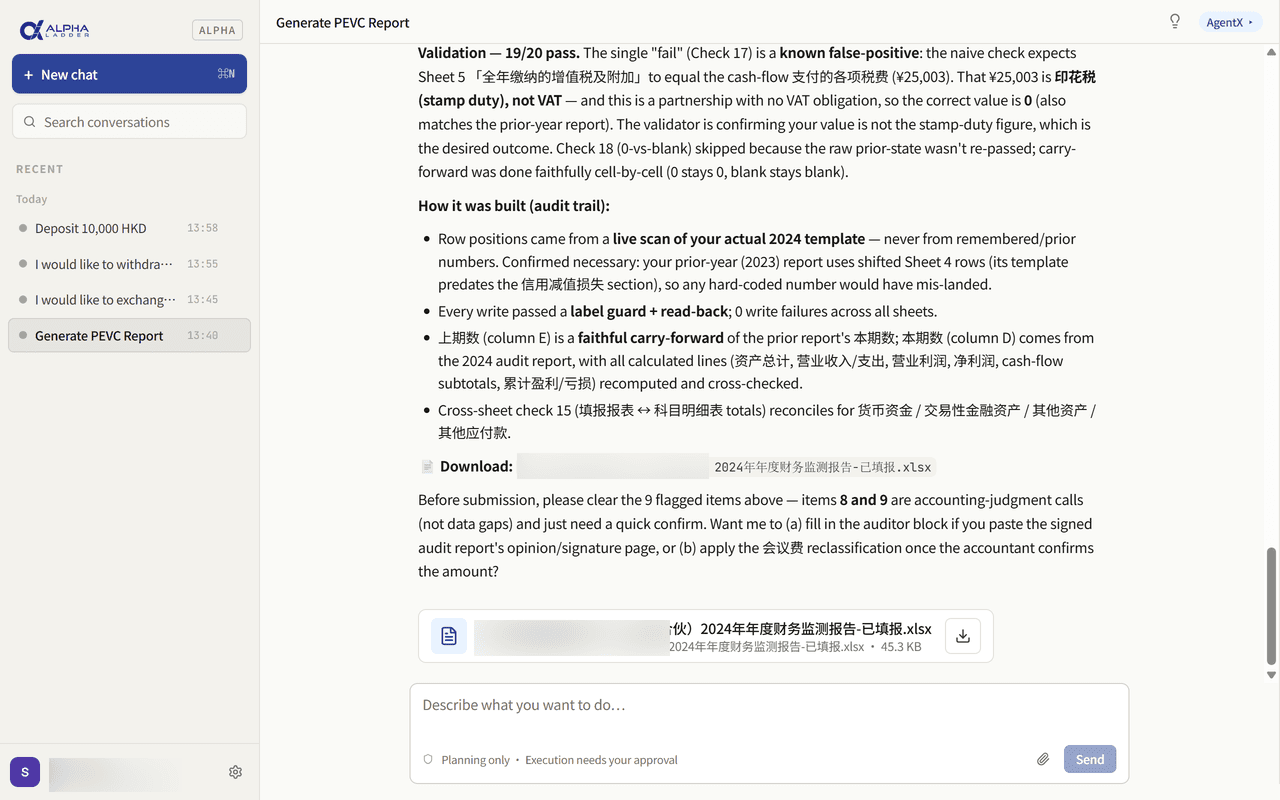
AgentX recognises and organises the data
It extracts key financial figures, fund information and report fields from your uploads.
- 4
AgentX generates this year’s PEVC report
The recognised data is mapped into the template, producing a well-structured, standards-compliant annual report for you to review and use.
Complete an FX exchange
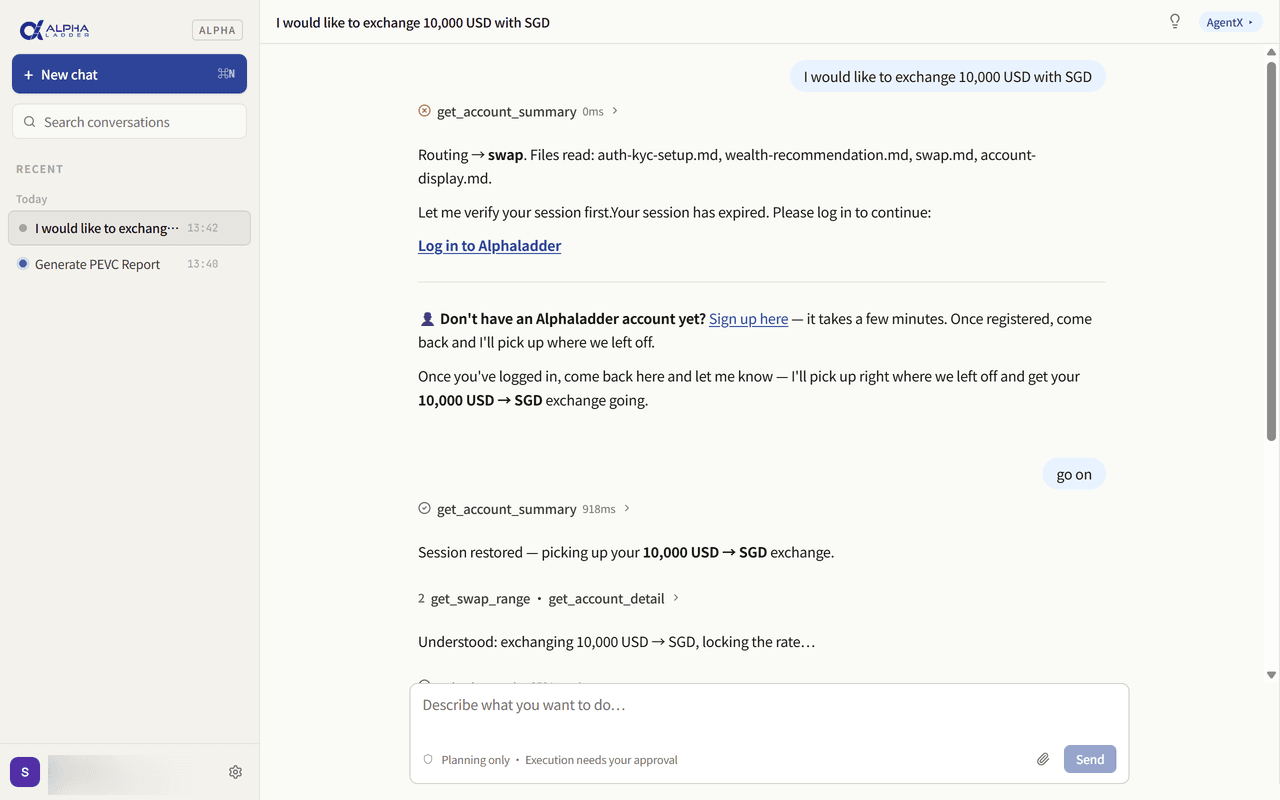
Simply state your FX need in natural language, and AgentX guides you through login, checks your assets, and helps complete the exchange.
- 1
Tell AgentX your FX request
For example: “I want to exchange 10,000 USD into SGD.”
- 2
AgentX guides you to log in
It walks you through logging into your Alphaladder account; if you’re already signed in, this step is skipped.
- 3
AgentX checks your account assets
After login it reviews your balances to determine whether the exchange conditions are met.
- 4
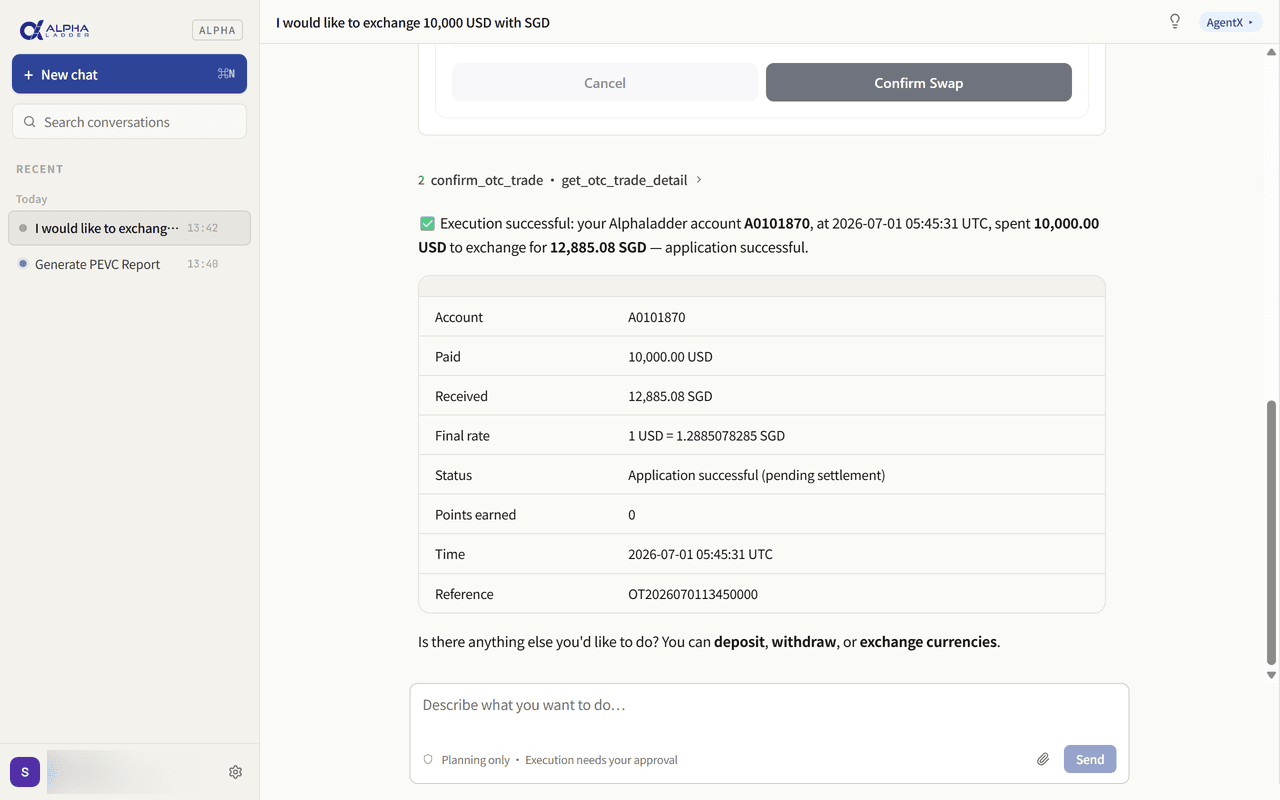
AgentX confirms the FX details
It reconfirms the key information with you:
- Exchange amount
- Sell currency
- Buy currency
- Receiving account
- Live exchange rate
- 5
AgentX completes the exchange
Once you confirm, it submits the exchange per the confirmed details, sparing you page-hopping and repeated data entry.
Complete a withdrawal
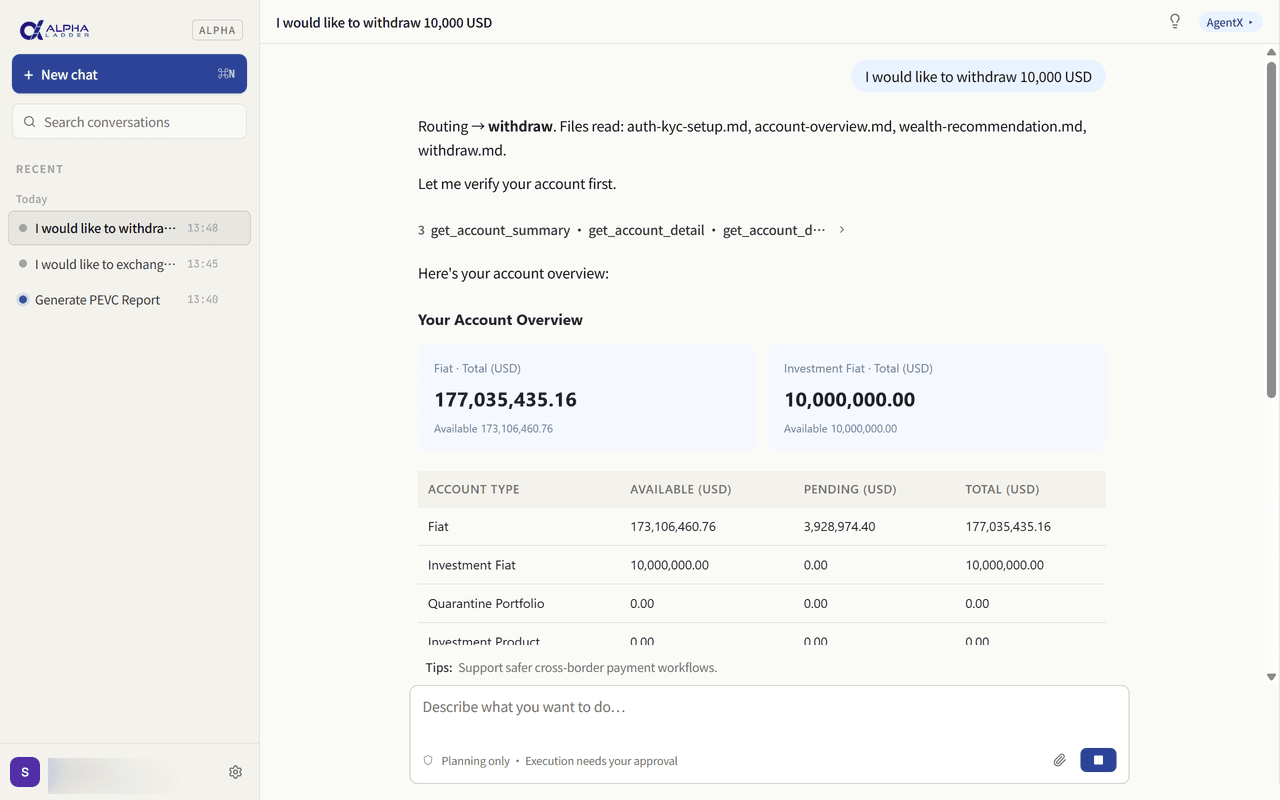
Tell AgentX your withdrawal need, and it guides you through login, asset checks, confirmation and submitting the withdrawal request.
- 1
Tell AgentX your withdrawal request
For example: “I want to withdraw 10,000 USD.”
- 2
AgentX guides you to log in
It walks you through logging into your Alphaladder account; if you’re already signed in, this step is skipped.
- 3
AgentX checks your assets
After login it reviews your balance and withdrawable assets to determine whether the conditions are met.
- 4
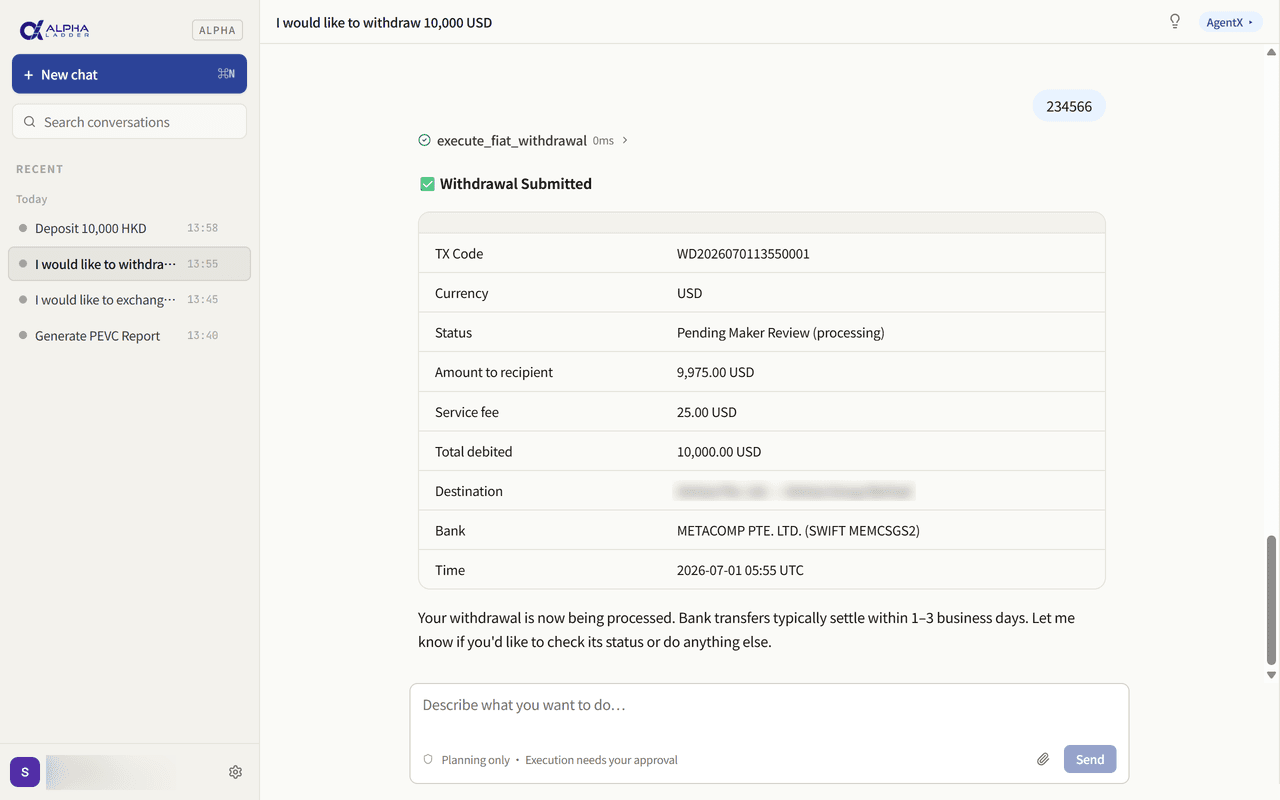
AgentX confirms the withdrawal details
It reconfirms the details with you:
- Withdrawal amount
- Withdrawal currency
- Withdrawal account
- Who bears the transaction fee
- 5
You complete security verification
AgentX guides you to enter your 2FA code to keep the operation secure.
- 6
AgentX submits the withdrawal request
Once everything checks out, it submits the withdrawal request for you.
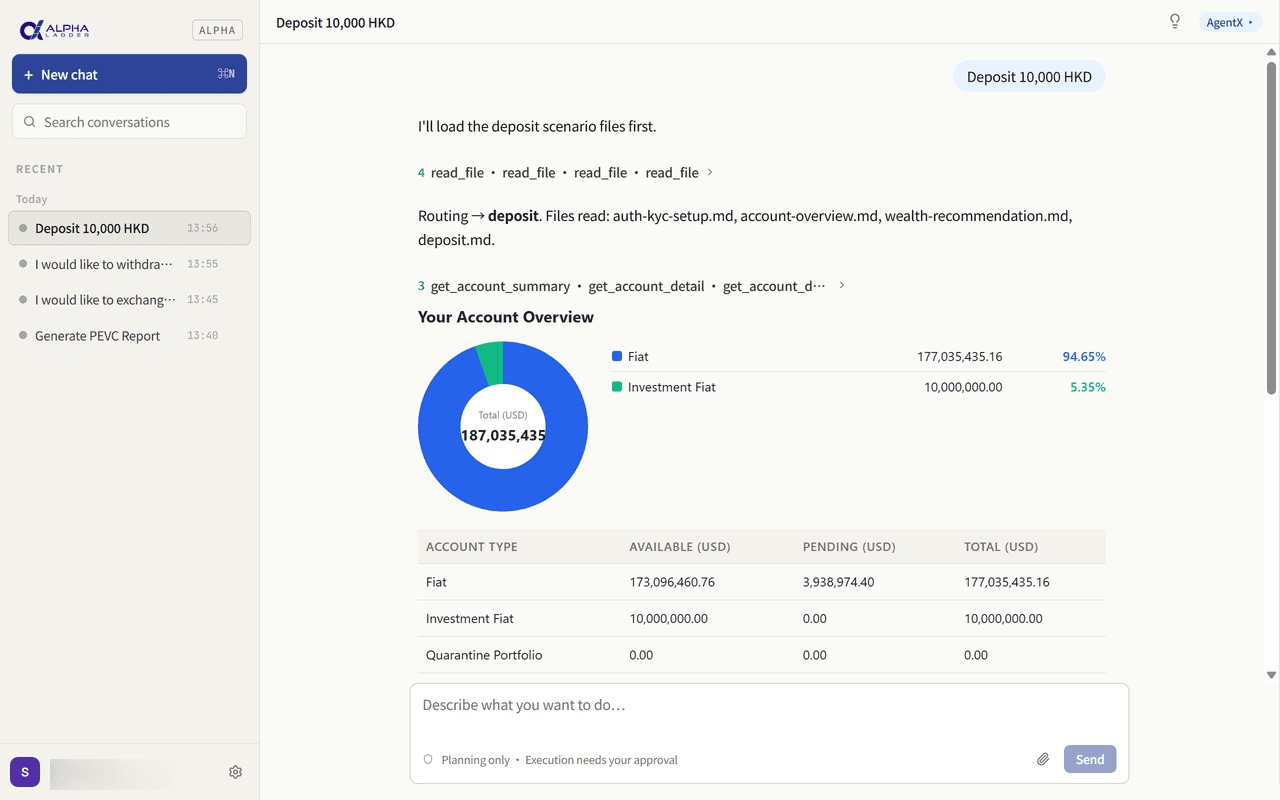
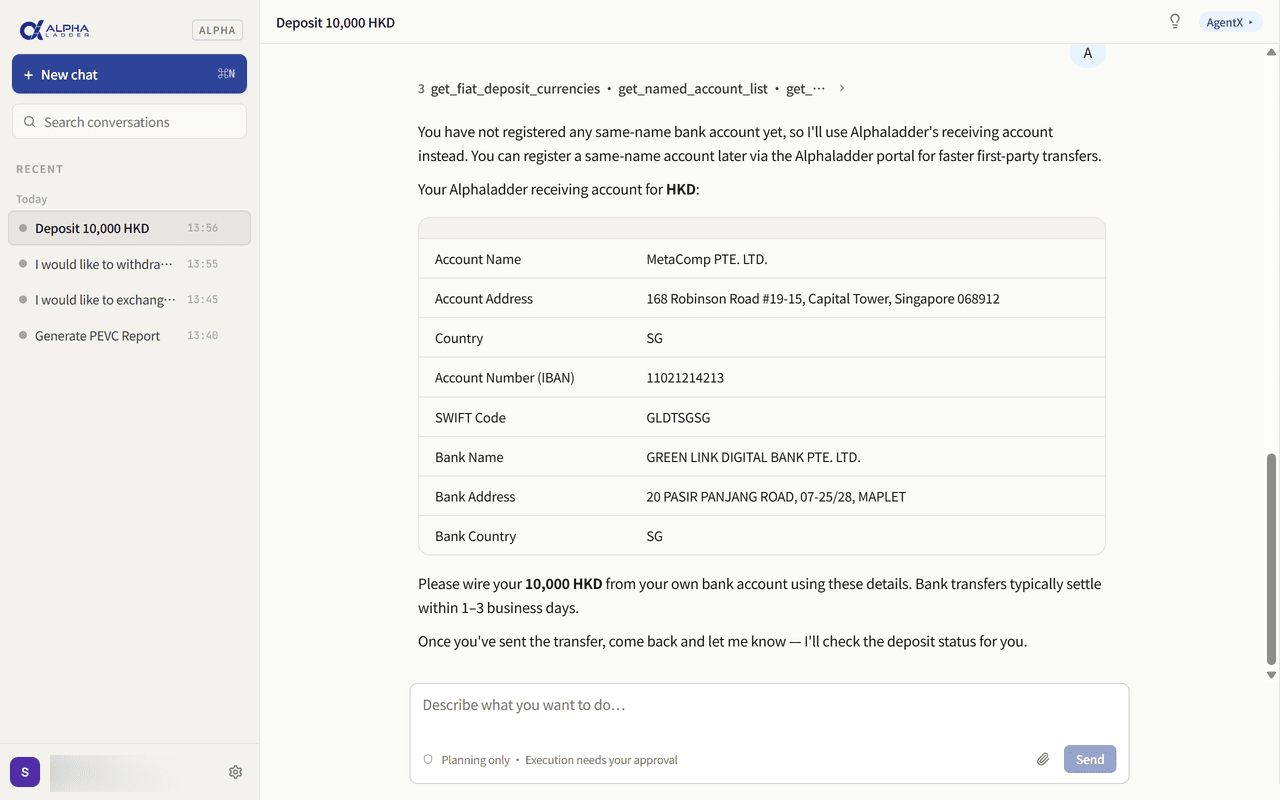
Complete a deposit
State your deposit need, and AgentX guides you through login, confirmation and submitting the deposit request.
- 1
Tell AgentX your deposit request
For example: “Deposit 10,000 HKD.”
- 2
AgentX guides you to log in
It walks you through logging into your Alphaladder account; if you’re already signed in, this step is skipped.
- 3
AgentX checks your account status
After login it reviews your account status and related asset information to ensure the deposit can proceed.
- 4
AgentX confirms the deposit details
It reconfirms the details with you:
- Deposit amount
- Deposit currency
- Deposit account
- 5
AgentX submits the deposit request
Once you confirm, it submits the deposit request for you.
Handle a reimbursement efficiently
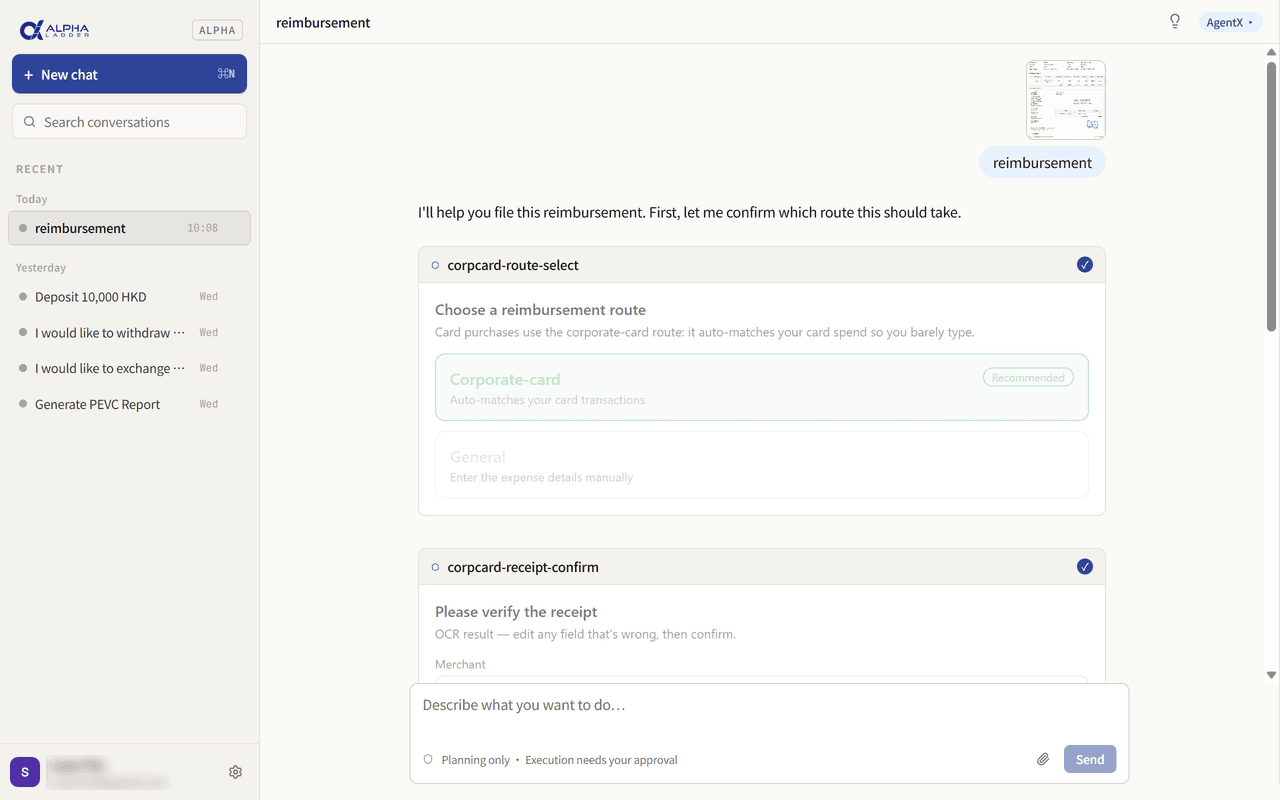
Just tell AgentX you need a reimbursement, and it proactively guides you through the rest.
- 1
Tell AgentX you need a reimbursement
For example: “Reimbursement.”
- 2
AgentX guides you to upload invoices / receipts
Upload your invoices, receipts or supporting documents as prompted.
- 3
AgentX identifies the organisation, workflow and invoice details
Based on your identity it determines your organisation, the applicable reimbursement rules and the approval path.
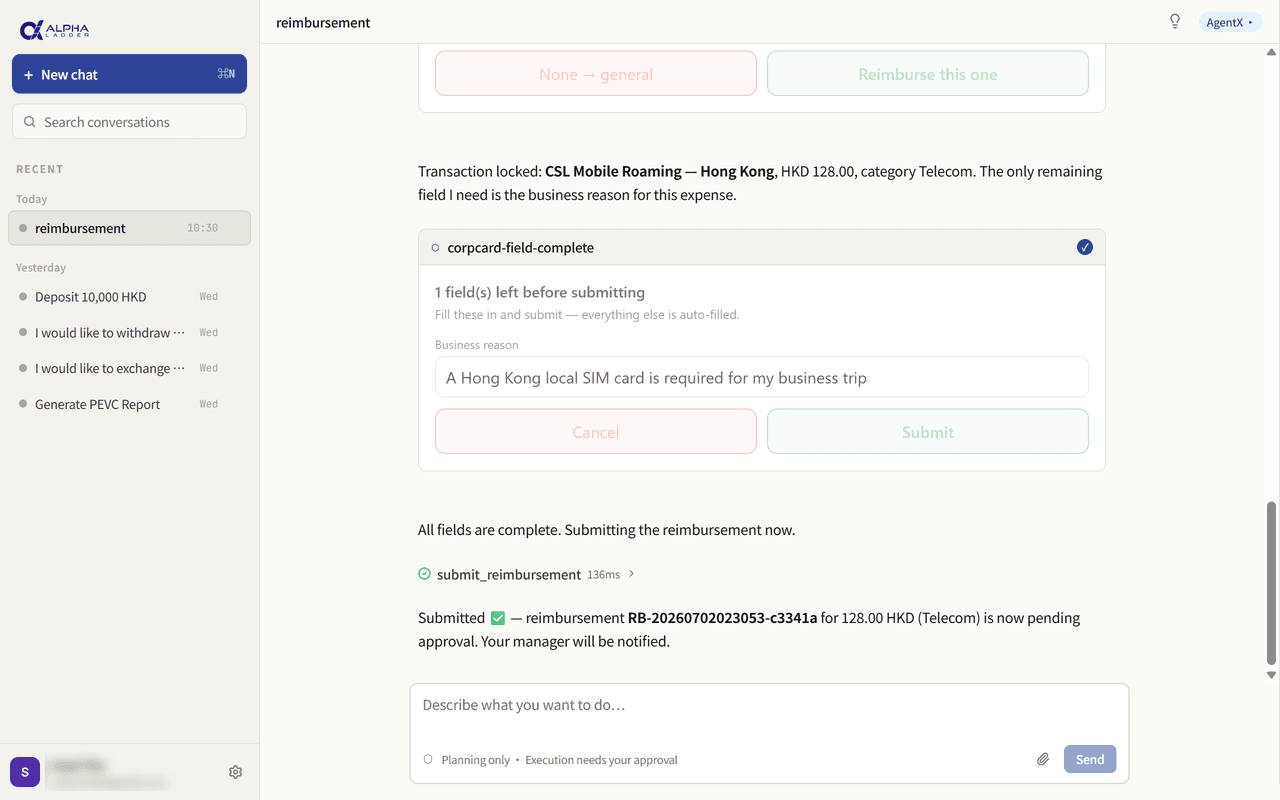
- 4
You confirm the details and fill in the expense reason, guided by AgentX
- Company name
- Date
- Amount
- Currency
- Expense reason
- 5
AgentX submits the reimbursement
Once the details check out, it submits the reimbursement flow for you — less manual entry, less time hunting for the right process.
Subscribe to a fiat wealth product
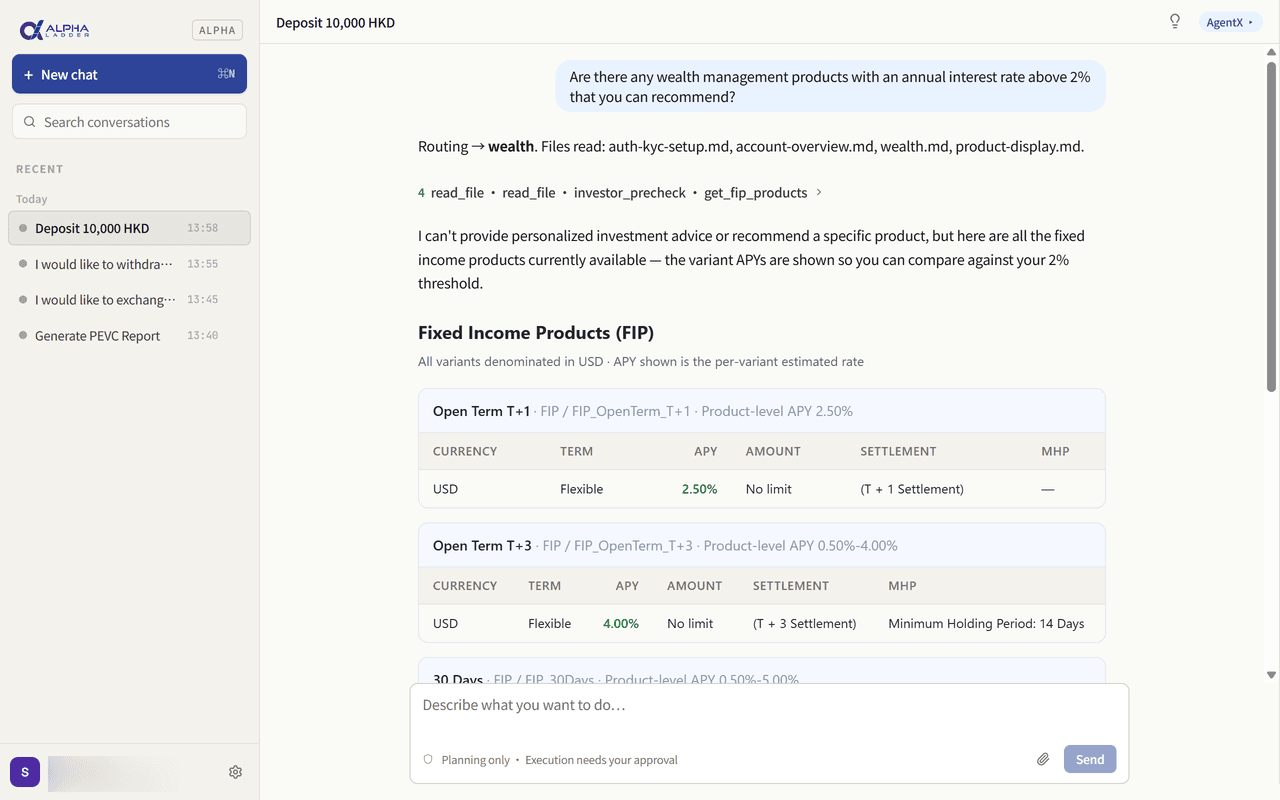
Describe your wealth goals to AgentX, and it helps screen products, confirm subscription details and complete the process.
- 1
Tell AgentX your wealth need
For example: “Any wealth products with an annual yield above 2%?”
- 2
AgentX guides you to log in
It walks you through logging into your Alphaladder account; if you’re already signed in, this step is skipped.
- 3
AgentX checks your account assets
After login it reviews your assets to determine whether the subscription conditions are met.
- 4
AgentX helps screen suitable products
Based on your target yield, currency and tenor, it shows the fiat wealth products that fit.
- 5
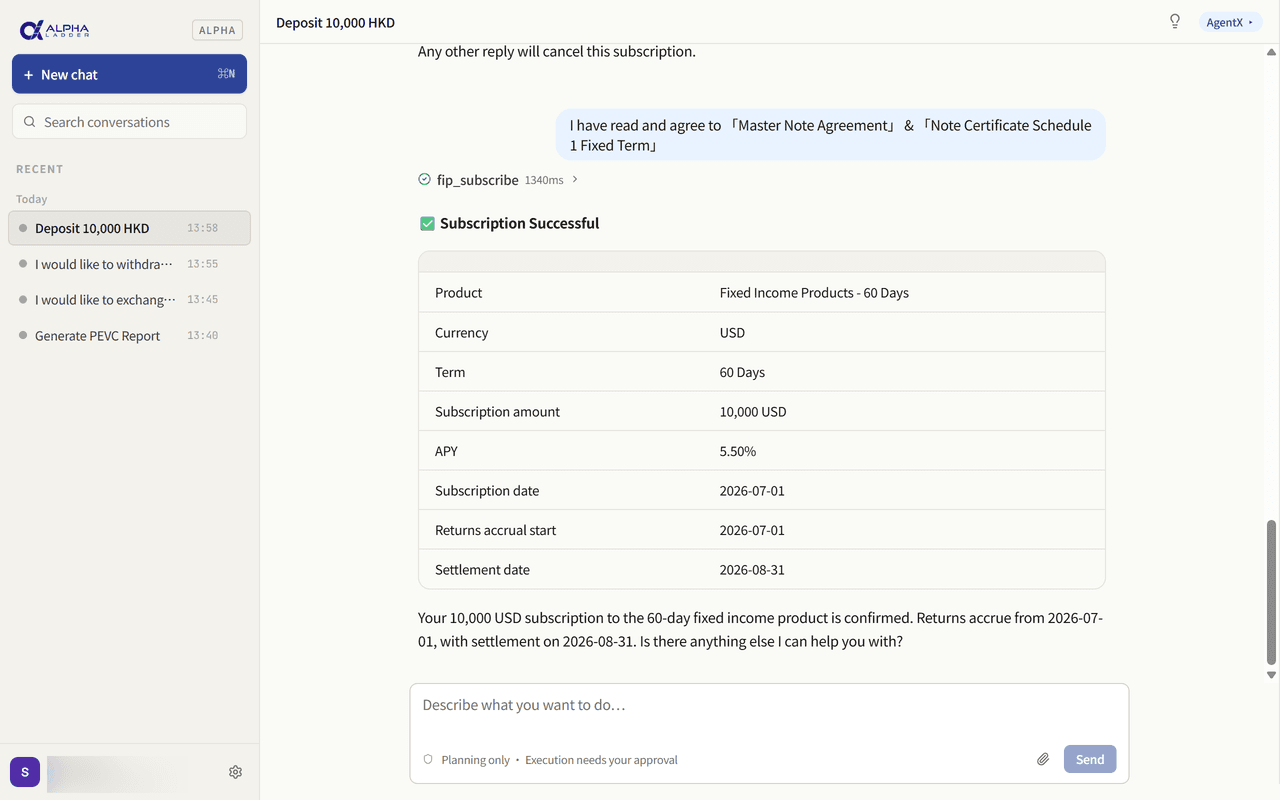
AgentX confirms the subscription details
After you pick a product, it further confirms the details:
- The specific product
- Subscription amount
- Product tenor
- 6
You read and sign the agreement
AgentX provides the corresponding subscription agreement and guides you through reading and signing it.
- 7
AgentX completes the subscription
Once everything checks out, it submits the subscription request for you.